用Google Search Console让个人主页被搜索到
0. Motivation
最近发现一个问题:
我已经把个人主页部署到了 GitHub Pages
地址是:
https://cyandyue.github.io/HomePage/
但谷歌搜索似乎搜不到
这时就需要用到 Google Search Console 去让 Google 抓取和索引我们的网页
它是 Google 给网站管理员用的工具,可以查看:
- Google 有没有看到你的网页
- 网页有没有被索引
- 索引失败时原因是什么
- 修改页面后能不能请求 Google 重新抓取
1. Overall
配置Google Search Console 的第一步是用任意一种验证方式来证明这个网站确实是我们的
常见验证方式:
- DNS 验证
- 上传 HTML 文件
- HTML tag 验证
- Google Analytics / Google Tag Manager 验证
如果是自己的域名,比如:
1 | |
可以选 Domain property,然后去 DNS 里加 TXT 记录
但如果是 GitHub Pages 的项目主页,比如我的:
1 | |
更方便的是选 URL prefix
因为它只验证这个 URL 前缀下面的页面,不需要改 DNS
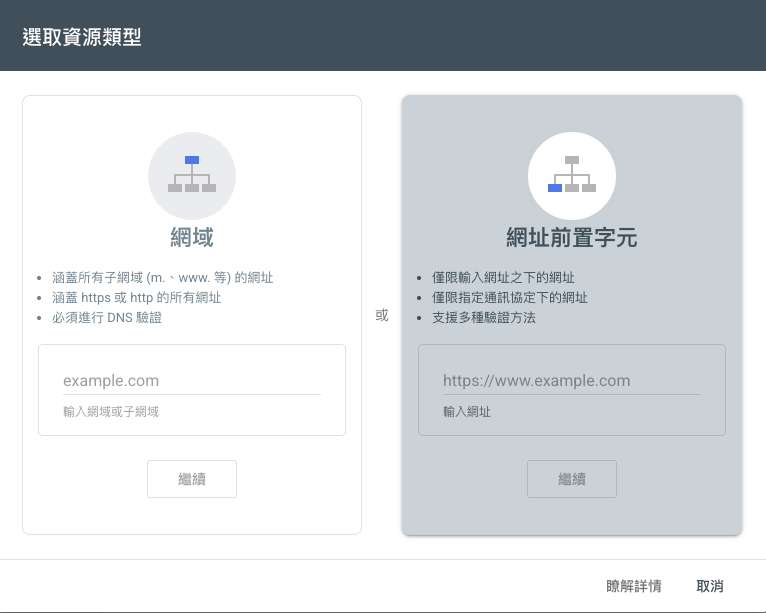
2. Add property
打开:
点击添加资源
这里有两个选项:
- Domain
- URL prefix
选右边的 URL prefix
然后填入完整 URL:
1 | |
这里最好完整写上 https:// 和最后的 /
3. HTML tag verify
接着选择 HTML tag 验证
Google 会给一行类似这样的代码:
1 | |
把它复制到主页 HTML 的 <head> 里即可
比如我的主页 index.html 里大概是这样:
1 | |
几个点需要注意:
- 放在
<head>和</head>之间 - 主页不能需要登录,Google 才能访问
- 记得 push 之后要等 GitHub Pages 部署完成,再回 Search Console 点 Verify
4. Check
过一段时间后,可以用 Google 搜索:
1 | |
如果能搜到,说明页面已经被索引
也可以搜索更具体的关键词,比如:
1 | |
5. Reference
用Google Search Console让个人主页被搜索到
https://cyandyue.github.io/2026/10/13/Web-google-search-console/